









Skip to content

Feature · Mailing

Smart Email Campaigns: Target, Automate, Succeed.

Create highly personalized email campaigns that land in the inbox, not in spam.

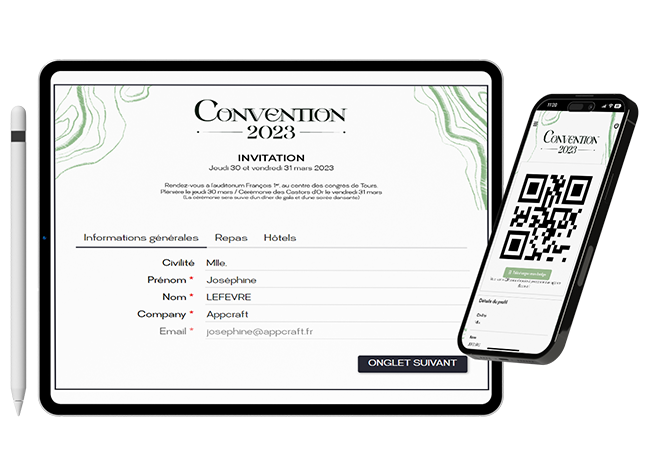
AppCraft interface for centralized and customized management of event invitations with QR codes.

One Template, A Thousand Profiles

Customize the content of your emails block by block according to the recipient.

Stop wasting time creating ten versions of the same email. With our smart editor and conditional content, a single template automatically adapts to every attendee profile (VIP, Press, Internal). Schedule your follow-ups, automate badge delivery and event itineraries, and track deliverability in real time using your own domain name.

Why create a "VIP" email and a "Staff" email? With AppCraft, set up conditional blocks within a single email. The "Dinner invitation" block only appears if the attendee belongs to the VIP group. You save precious time by managing just one template that adapts dynamically to the recipient's data (name, form answers, workshop choices).

Discover how to simplify your invitations

Marketing Automation & Follow-ups

Schedule your follow-ups and reminders so you don't have to deal with anything in a rush.

Plan your success in advance. Set up smart workflows: an automated follow-up for non-registrants 7 days out, a reminder with a QR code the day before the event, or a thank-you email sent 2 hours after it ends. Once scheduled, the event website works for you, delivering consistent, relevant outreach without any manual effort on your part.

Launch your email campaign now

Dynamic Attachments & PDF Generation

Automatically send personalized tickets, itineraries, and invitations.

Streamline logistics for your attendees. Our emails natively embed the access QR code for lightning-fast check-in. Even better, the system can generate and attach personalized PDFs on the fly: name badges, boarding passes, or individual itineraries detailing their selected workshops. Plus, the included ICS file lets them add the event to their calendar in a single click.

Create your personalized invitation site

Maximum Deliverability (White Label)

Your emails, your domain, your reputation.

Trust is key to high open rates. Configure AppCraft to send emails via your own domain name with full authentication (SPF/DKIM). This ensures your messages steer clear of "Spam" or "Promotions" folders while reinforcing your professional brand image with your recipients.

Talk deliverability with an AppCraft expert

"Real" preview

Zero margin for error before mass mailing.

Nothing's worse than an email with an unreplaced "Hello {First name}" field. Our preview tool lets you see the exact rendering of the email for a specific attendee (e.g., "View as Mr. Dupont"). You can check that the conditions apply properly and that the data merges correctly. Send unlimited proofs to your team before the big leap.

Build your invitation workflow
"Real" preview

Tracking & Error Management

Identify in real time who received, opened, and clicked.

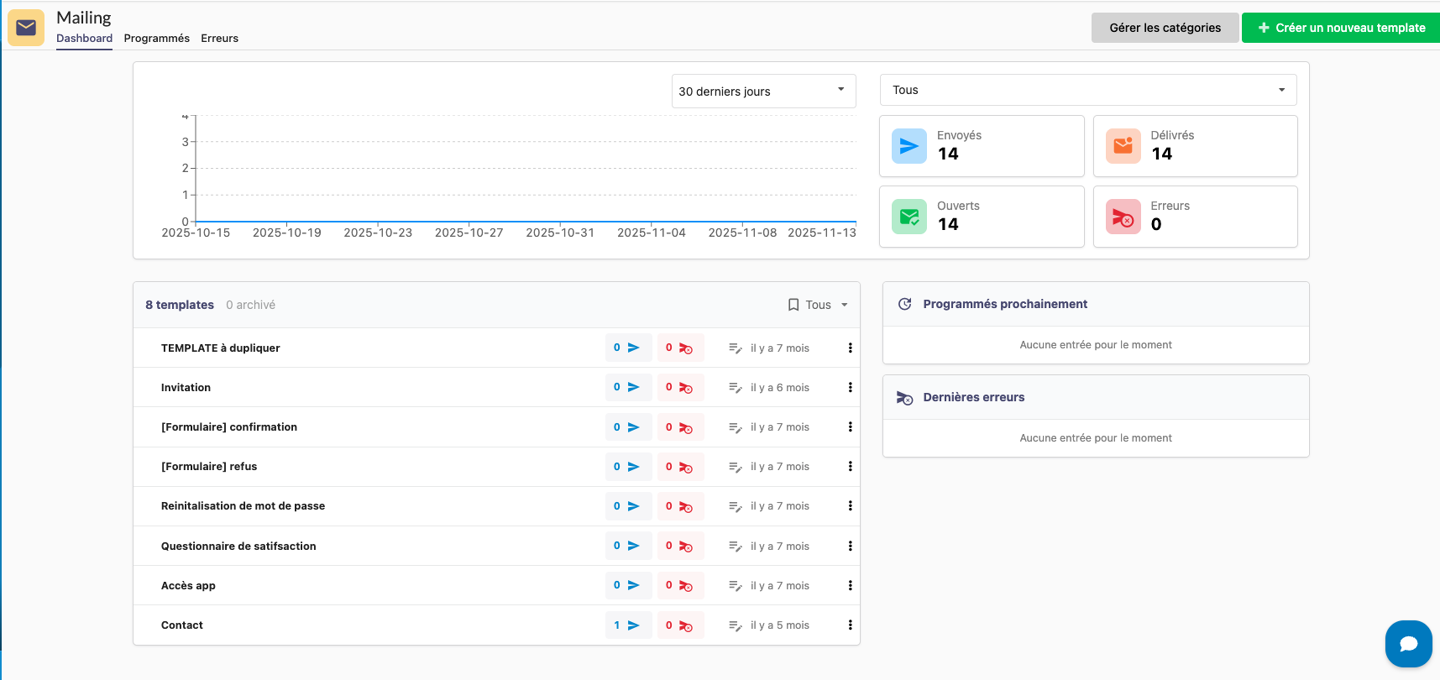
Don’t fly blind. Access a detailed dashboard tracking open and click rates. More importantly, our tool centralizes delivery errors (hard bounces, soft bounces, invalid addresses) so you can correct erroneous emails immediately and maintain a clean, GDPR-compliant contact list.

Run your campaigns in full GDPR compliance
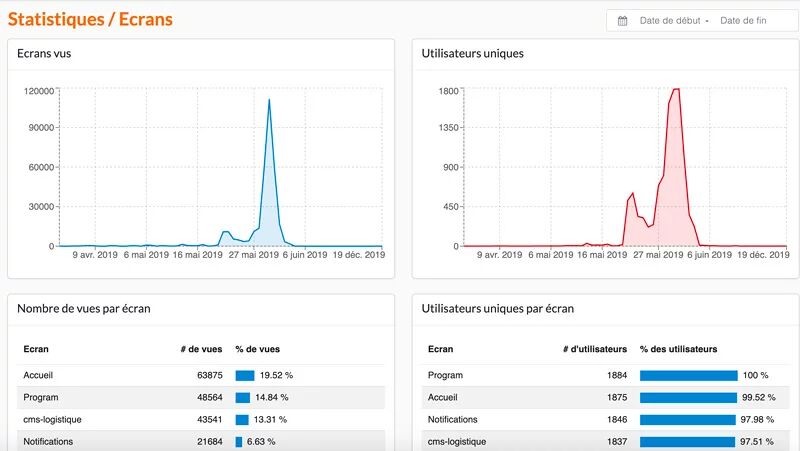
AppCraft event screen statistics with views per screen, unique users, usage rates and per-page performance analysis

FAQ: How can you automate and customize your event invitations?

How do you choose invitation and email software for a business event?

The choice of email marketing software for events depends on the number of guests, the various participant profiles, and the desired level of personalization.

For a small event, a standard email marketing tool may be sufficient. However, a conference, seminar, or convention often requires personalized invitations, automated reminders, and detailed tracking of registrations.

AppCraft integrates email marketing with its attendee database. This allows organizers to personalize messages, automate certain email campaigns, and track campaign results directly from their event platform.

How can I customize invitations for VIPs, speakers, and staff without having to create multiple emails?

To customize invitations for different audiences, you can use a single template that contains conditional content blocks.

With AppCraft, organizers can specify which information to display based on each recipient's profile or data.

For example, at a convention, a VIP guest receives information about a private dinner, while a speaker receives instructions regarding their presentation. Employees have access only to the information that pertains to them.

This method makes it possible to tailor communications to each audience without having to manually create and manage multiple versions of the same email.

How can I automate follow-ups for guests who haven't registered yet?

To improve the tracking of invitations, it is recommended to schedule targeted follow-ups based on each recipient's status, rather than systematically resending the same message to the entire list.

AppCraft lets you set up automated email campaigns. For example, a reminder can be scheduled seven days before an event for guests who haven't yet confirmed their registration.

It is also possible to set up reminder or thank-you messages at various stages of the participant's journey.

This automation minimizes manual tasks while tailoring communications to each guest's situation.

How can I automatically send badges, tickets, and personalized itineraries?

To send individual information without having to prepare each document manually, it is best to use an email solution that is linked to the participants' data.

AppCraft allows you to automatically generate and attach personalized PDFs to emails: name badges, tickets, or itineraries that include each participant’s workshop selections.

Organizers can also attach an ICS file to allow guests to add the event to their calendars.

This feature is particularly useful for residential seminars, conventions, and events that require personalized logistical communication.

How can I improve the deliverability of invitations and verify that they were actually sent?

To improve the deliverability of event invitations, it is important to use a properly authenticated sender domain, verify recipient addresses, and test the emails before sending them.

AppCraft allows you to send invitations from the organizer's domain with SPF/DKIM authentication. The platform also offers a preview of emails for each profile and the ability to send test emails before distribution.

Organizers can then view statistics on sends, opens, clicks, and delivery errors.

However, no solution can guarantee that an email will always end up in the inbox.

Ready to save time on your next events?

Join the 1,500+ event planners already running their B2B events with AppCraft.

Free personalized demo · Reply within 24 hours