Interactive Webinar: How to Use Q&As, Polls, and Quizzes to Engage Your Audience?
How do you hold an audience's attention during a professional conference? Quality speakers and presentations are essential, but they're not always enough to encourage participation. An interactive conference gives attendees the chance to share their opinions, ask questions and help shape the discussion. Three tools complement each other particularly well here: live polls, Q&A and interactive quizzes. Their effectiveness depends less on how many you use than on where they fit in the program and how the responses are used.
What if your next conference gave the audience a greater voice?
Which interactive tool should you choose based on your conference's objectives?
Polls, Q&A and quizzes don't serve the same purpose. Before adding them to the program, the organizer should identify what they expect from each interaction. Live polls help you get to know your audience. From the opening, they can be used to gauge attendees' level of knowledge, collect their opinions or identify their concerns. Imagine a conference on artificial intelligence. The speaker could ask: "What's your main obstacle to adopting AI?" The results, displayed on screen, would let them adapt the examples they use during the talk. Q&A lets you go deeper into the discussion. Rather than setting aside a few minutes for questions at the end of a presentation, attendees can submit them gradually from their smartphones. A voting system can also bring up the topics that generate the most interest. This gives the host more visibility into the audience's expectations, while making it easier for people who'd rather not speak up in front of a crowd to take part. Interactive quizzes help reinforce knowledge. They fit especially well after a technical talk or an information-heavy presentation. A three-question quiz on the main takeaways of a conference can, for example, let the host revisit certain concepts and clarify points that need further explanation. So the choice of tool depends above all on the result you want: gathering an opinion, exploring a topic in depth or supporting learning.
How can we incorporate these interactions without disrupting the program?
A successful conference needs to keep a consistent pace. Piling on activities without regard for the content of the talks can have the opposite effect from the one intended. The key is to pick a few strategic moments. Take the example of a one-hour professional conference. Example: a 60-minute interactive conference An indicative flow to adapt to the length of the talks and the audience profile. 1) 0–5 min: poll attendees An opening poll lets you learn where they stand on the topic and introduce the issue. 2) 5–35 min: present and collect questions Speakers develop their ideas. Meanwhile, the audience submits questions through a Q&A module and can vote for other attendees' contributions. 3) 35–40 min: run a quiz A few questions revisit the key takeaways before moving on. 4) 40–55 min: answer audience questions The host selects the relevant questions and moderates the discussion with the speakers. 5) 55–60 min: wrap up A final poll can identify the topics attendees want to explore further. This flow keeps most of the time for talks and discussion, without turning the conference into a string of activities. It's also important to explain how to participate right from the start. A simple instruction, with a QR code or access from the event app, makes it easier for people to use the tools. Finally, speakers and the host need to know the setup in advance: who launches the polls, who moderates the questions and who comments on the results? This preparation avoids needless interruptions during the conference.
How can we encourage participation without overwhelming the audience?
Making interactive tools available doesn't guarantee they'll be used. Their success also depends on how they're hosted and how accessible the setup is. The first rule is to simplify access. Attendees should be able to answer a poll or ask a question from their smartphone, with no complicated procedure. It's best to explain how the tools work at the very start of the conference. The second is to value contributions. When a speaker comments on poll results or answers a question from the audience, it shows that participation really contributes to the discussion. Moderation is also essential. At conferences with a large audience, questions can be numerous and sometimes repetitive. Selecting them in advance keeps the most relevant ones and respects the time available. AppCraft's engagement features let you centralize polls, quizzes and Q&A. Attendees can submit their questions from their mobile and vote for the ones that interest them. Moderation options let the organizer stay in control of the discussion. The goal isn't for everyone to speak constantly, but for every attendee to have a simple, relevant way to contribute.
How can you measure the effectiveness of an interactive conference?
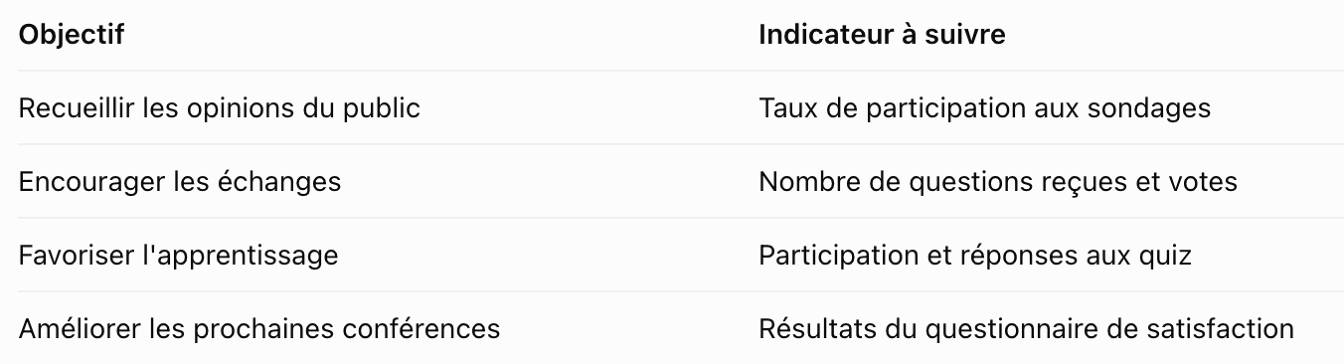
Interactive tools offer organizers another benefit: they let you collect information directly during the event. But analysis shouldn't stop at the volume of interactions. To understand what really worked, it helps to tie each indicator to a specific goal. These indicators need to be interpreted in context. For example, a highly specialized conference may prompt few questions but lead to particularly in-depth discussions. It's worth complementing quantitative data with qualitative feedback collected after the event. AppCraft's statistics and reporting features can support this analysis by letting you track participation in activities and use voting results. This information helps organizers identify the most relevant formats and improve their next editions.
Conclusion: Interactivity should support the conference content
An interactive conference doesn't need a pile of activities. It relies above all on making relevant use of the tools available. A poll to understand your audience, a Q&A to deepen discussions and a quiz to reinforce knowledge can transform how your audience participates. The real challenge is offering interactions that enrich the talks without disrupting their flow. With its event engagement solution, AppCraft lets organizers build these different tools into their professional events.
FAQ: How to Host a Successful Interactive Conference
How can you make a conference more interactive?
To make a conference interactive, organizers can incorporate live polls, digital Q&A sessions, and quizzes. The key is to select tools that align with the objectives of the sessions and to set aside specific times to review participants’ responses.
How do you organize a Q&A session during a conference?
A Q&A session can be organized using an app that allows participants to submit their questions from their smartphones. Questions can be collected during the presentations and then selected by a moderator before being posed to the speakers.
When is the best time to launch a poll during a conference?
A poll can be particularly useful at the beginning of a presentation to gauge the audience’s expectations, or at the end to measure how opinions have changed. It can also be incorporated into a presentation when it directly relates to the topic being discussed.
to change image ·