









Skip to content

Feature · Speakers

Give your experts a voice and enhance your content

Simple spotlighting of your speakers, perfectly integrated into your program

Speakers & presenters

An intuitive discovery experience

Cross-navigation between Profiles and Program

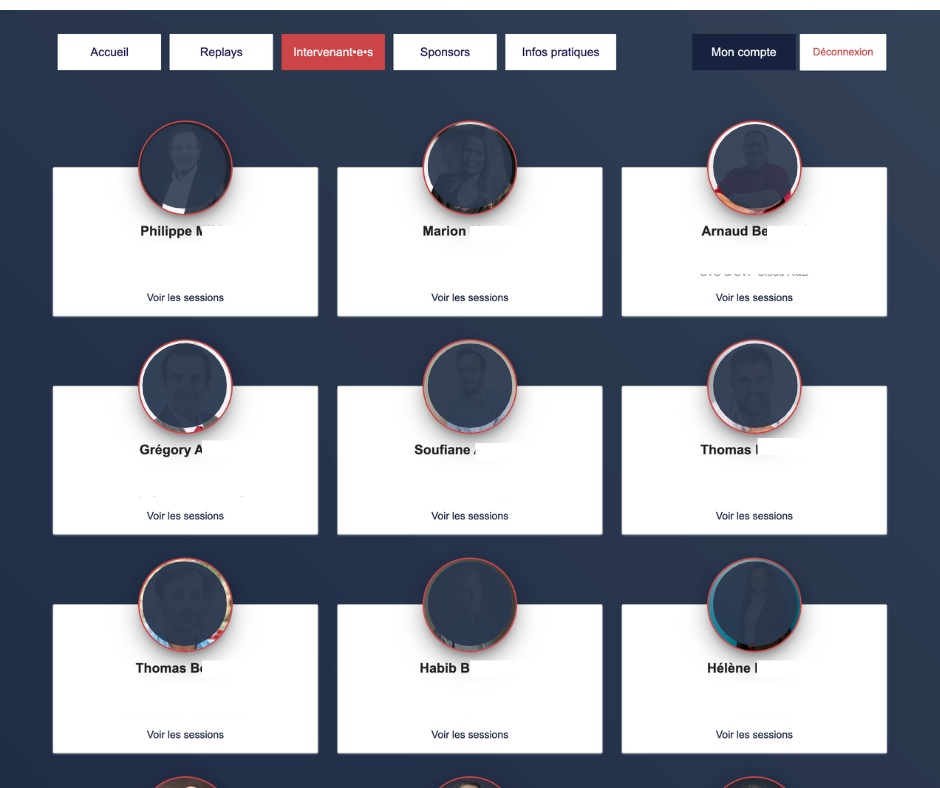
Showcase the talent driving your event. Build comprehensive speaker profiles in just a few clicks and automatically link them to their sessions. Whether they are internal team members, VIP guests, or exhibitors hosting a session, give your attendees an intuitive way to discover who's speaking about what.

Don’t make your attendees hunt for information. On AppCraft, every speaker profile is clickable, dynamically displaying all their sessions and workshops. Conversely, a single click on a session from the program reveals the full speaker lineup. This seamless, two-way navigation lets attendees build their personal schedule by following their favorite experts—completely friction-free.

Create a speaker profile

Unified Profile Management: Centralize your talent, whether internal or external

Manage your VIPs and employees with the same rigor thanks to simplified administration from the Back Office.

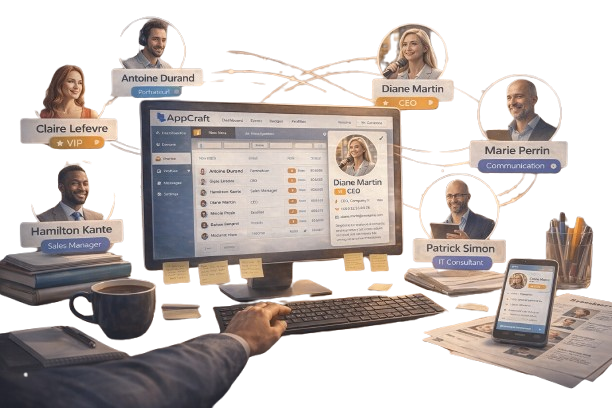
Organize your speaker directory with total clarity. Whether it’s your CEO, an international guest speaker, or an internal trainer, manage all your profiles in one place. The AppCraft Back Office lets you categorize your speakers to customize how they are displayed (such as spotlighting VIPs). Updating a photo or bio is instantly reflected across the website and the mobile app, guaranteeing seamless consistency.

Discover profile management
Centralized management of VIP, speaker and employee profiles in the AppCraft back office, synced with the website and mobile app

Synergy between Exhibitors & Content: Break down barriers between your partners

The exhibitor becomes a participant in the event

Innovative and practical, this feature allows exhibitors to also be recognized as speakers and manage their own workshops. This offers your partners double visibility and enriches your program without any extra effort on your part. The link between the booth (exhibitor) and the conference (speaker) is native, maximizing ROI for your sponsors.

Discover the full agenda

Search Engine Speakers: help your participants make their choice

Find the expert, find the topic

For a large conference with 50 or 100 speakers, an alphabetical list is not enough. Our module includes dynamic filters: participants can search for a speaker by name, company, area of expertise, or keyword.

It is a valuable tool for participants who build their agenda based on the personalities present. It saves time for the user and ensures that no key presentations are missed.

Create or edit a speaker profile

FAQ - Stakeholder Management

How do you choose vendor management software for a professional event?

The choice of speaker management software depends on the number of speakers, the complexity of the program, and the information to be shared with participants.

For an event with just a few speakers, a traditional presentation may be sufficient. However, a convention or conference featuring multiple sessions requires centralized management of speaker profiles and speaking slots.

AppCraft lets you create speaker profiles, link them to presentations and workshops, and make them accessible through the event program. This allows participants to learn about the experts and easily find their presentations.

How should speakers and their presentations be listed on an event website?

To highlight the speakers, each profile should include information that is useful to attendees: photo, name, title, company, biography, and presentations.

AppCraft lets you create speaker profiles that are directly linked to the event program.

From a profile, participants can view all the sessions in which an expert is participating.

Conversely, after attending a conference, they can learn about the various speakers.

This navigation makes it easier to explore the program and helps participants select sessions that match their interests.

How do you manage an event with several dozen speakers?

When an event brings together many participants, it is important to centralize their information to avoid inconsistencies across different communication channels.

AppCraft allows you to manage profiles from a single back office, categorize them, and adjust their visibility based on their status—particularly to highlight VIP speakers.

Organizers can also edit biographies and photos from this interface. Changes are automatically reflected in connected event materials. This centralized management makes updates easier, especially when the program includes many sessions.

How can we help participants find speakers who match their interests?

For a convention or conference bringing together many experts, a simple alphabetical list isn't always enough. Participants need to be able to search for speakers based on the topics that interest them.

AppCraft offers a search engine that allows users to filter speakers by name, company, area of expertise, or keyword.

Since each profile is linked to the corresponding sessions, participants can explore an expert’s talks and customize their event itinerary based on their interests. This feature is particularly useful for events featuring multiple concurrent sessions.

How can we highlight exhibitors and sponsors who participate in an event?

When an exhibitor or sponsor also hosts a conference or workshop, it makes sense to link their commercial presence to their presentations.

AppCraft allows you to link an exhibitor to a speaker profile and to the sessions they are leading. This enables participants to find their presentations in the program while learning more about their company through their exhibitor page.

This dual exposure is particularly valuable for trade shows and conferences, where some partners wish to share their expertise in addition to their presence at a booth.

Ready to save time on your next events?

Join the 1,500+ event planners already running their B2B events with AppCraft.

Free personalized demo · Reply within 24 hours